JJJ's Blog

  • WordPress
  • GitHub
  • Twitter/X
  • WordPress as an Environment

    As WordPress has matured over the past few years, my perspective has shifted to think of it as the environment I develop in. I no longer really associate myself as being a PHP developer, a front-end or back-end developer, an architect, or a designer.

    This both scares and delights me.

    To be a good WordPress developer, it helps to understand how all of the skills come together to create the perspectives I just mentioned, and how they apply specifically to WordPress — far beyond the conventions of everyone’s favorite PHP stack.

    • Front-end WordPress development requires knowledge of WordPress’s theme options, template tags, template hierarchy, theme hierarchy, and action order.
    • Back-end WordPress development requires knowledge of WordPress’s object cache, action order, what filters to use when and why, when to use custom tables, and having a plan to scale beyond WordPress’s built in table schema.
    • Architecting for WordPress requires extensive knowledge of WordPress’s action order, WordPress’s included functions and APIs, the WordPress coding standards, and liberal use of phpdoc and inline documentation.
    • Designing WordPress themes requires an intimate knowledge of what WordPress is actually designed to do, and then being able to think outside of that box to create visually stunning sites that push WordPress to it’s limits.

    Because of this, it’s safe to say WordPress is our environment now, and PHP is just the platform it runs on. WordPress is popular and complex enough now where it’s a great time to specialize on one area, and become the go-to person in that area. Taking this a step further, focusing on individual plugins or themes is actually where we are today.

    Part of what makes being a WordPress developer so fun is being able to load-up a new installation and start creating new and amazing things in a matter of seconds. As WordPress evolves with smarter warnings, sandboxing of plugin activations, and doing_it_wrong() notices, we’re watching WordPress shape-shift from a bunch of PHP scripts on a server, into the environment we create, live inside of, build enhancements for, all while individually influencing it’s direction.

    It’s at this point, WordPress and it’s community of contributors deserve much more recognition and thanks than they usually get.

    Building an environment, is hard to do.

    “WordPress as an Environment” is what comes next; a future where WordPress shields us from annoying things it can detect and protect us from, both as users and developers; an environment where WordPress can detect two plugins are trying to perform the same action, and safely prevent conflicts; one where several posts of different types will be allowed to have the same slug without colliding with each other. More over, I can’t wait until WordPress allows plugins to register template parts, so completely theme-agnostic features can be built with no additional effort. (BuddyPress, bbPress, Shopp, and WP eCommerce are making huge strides here.)

    When you think of WordPress as an Environment, you realize how much we depend on WordPress core to protect us from ourselves and each other. A future where the correct safeguards are in place to help us not shoot our own feet or get caught in cross-fire is one I hugely look forward to.

    JJJ

    August 14, 2012
    Software, WordPress
  • Custom Plugin Header Image Label

    Back in December of 2011, Matt and friends added the ability for WordPress plugins to have really pretty header images. For BuddyPress, I went through a few design iterations before settling on the header image pictured at the bottom of this post. I wanted it to be minimalistic and unique, so I took an hour to extend the label area with the buddies at the end. Below is the basic approach to make that happen:

    • Take a screen shot of the header image without the extended icon area.
    • Open that screen shot in Photoshop or your favorite image editor.
    • Make a new layer.
    • Fill the new layer with a black close to whatever the primary color of the label is. (#181818)
    • Hide that layer, select the background layer.
    • Magic wand the label.
    • Extend the selection to the size you want it to be (Usually 50px or so.)
    • Switch to your all black layer.
    • Right click; Select inverse; Delete.
    • Tweak the opacity of your black layer to match as closely as possible. Take your time with this; even if it’s the slightest bit off, it’s pretty noticeable.

    JJJ

    August 5, 2012
    BuddyPress, Software, WordPress
    assets, Plugins
  • Retina 2x downsampling

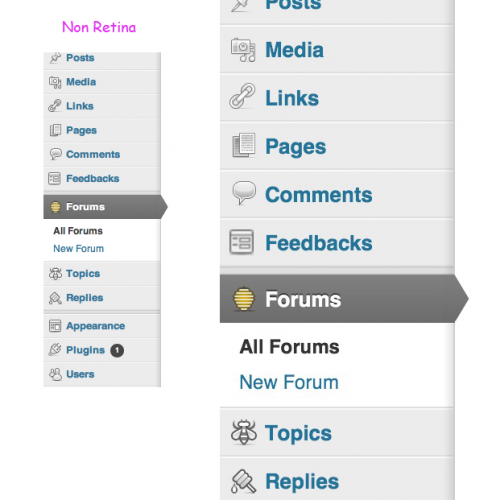
    While working on some 2x retina images for WordPress.com, and the bbPress and WordPress open-source projects, I found an image rendering issue that I haven’t seen documented anywhere yet. Here’s the WordPress core retina ticket, for reference.

    The first image highlights the difference between the WordPress core 2x icons, and the bbPress 2x icons. Notice how the icons next to Forums, Topics, and Replies have a slightly thicker black outline, specifically in 2x mode. The icons next to Posts, Pages, et all, are WordPress’s icon32 equivalents, with the same border thickness as the original 32px icons used in the 1x headers.

    Using the original 32px icons was a great idea for a first-pass win at having 2x icons in WordPress core, and there are 64px equivalents now too! The difference between the WordPress and bbPress icons is subtle but important when you look at the second image in the gallery.

    If the browser loads 2x images, but the display (for whatever reason) renders in 1x mode, you naturally end up with downsampled 2x images. To purposely duplicate this behavior:

    • Have a Retina MacBook Pro.
    • Connect Cinema Display.
    • Open Safari.
    • Move Safari 50% between the rMBP display, and the Cinema Display.
    • Watch any 2x images downsample to 1x size.

    While edge case, the circumstances where a browsers’ calculated pixel ratio does not match the display are a new bug from a new convention. Arguably, operating systems and graphics cards should handle this more smoothly, and I suspect they will eventually. Until then, if the risk is providing a worse experience than plain-old 1x images, it’s our responsibility to include 2x images that will downsample to a usable state in 1x mode.

    Weird, wild stuff!

    JJJ

    July 20, 2012
    CSS, bbPress, Software, WordPress
    2x, hidpi, Retina
  • iTether Download Link

    If you’re a user of the old iTether app like I am, and you need to re-download the OS X app, here’s the original download url.

    http://tether.com/i/Tether-iPhone.dmg

    Took me a while to find it again since they switched to the reverse proxy HTML5 method.

    JJJ

    July 16, 2012
    Software
    macOS
  • Confessions of an Open Source Workaholic

    Hi, my name is John, and I’m an Open Source Software workaholic. I touched on it a bit in my WPCandy interview, and I thought I’d finish the story here with a few added thoughts.

    I live in a great neighborhood on the east side of Providence, RI. I work from home, rarely drive my car (ignore the frequent road trips), and enjoy the luxury of being walking distance from food, laundry, spirits, and anything else I might need to live a happy and comfortable life.

    By day, I work for Automattic. I love my job. I love my colleagues. I love everything about what I do. To say it’s a dream job is an understatement. I work on some really awesome stuff going on around WordPress.com, Jetpack, Gravatar, and try to poke my head into other interesting social bits as much as possible.

    By night, I’m the lead developer of bbPress, BuddyPress, and maintain both of the bbPress.org and BuddyPress.org sites. I believe both projects are two of the strongest spokes attached to the WordPress hub, and it’s my pleasure and privilege to be so closely involved with them. I am passionate about their success and enjoy iterating and improving them both equally, and love to help their users whenever I can.

    That said, I’m in a unique and misunderstood position.

    I work 40+ hours at a job that I love. Most days when I’m done with work I switch gears to my hobbies; usually that’s bbPress and BuddyPress. Other days, I enjoy going to the park with my dog Paul, watching Netflix, or enjoying a nice meal with friends.

    In 2010 and 2011, I had the pleasure of mentoring some really bright individuals as part of the Google Summer of Code and the Google Code In projects. Gautam Gupta, a 15 year-old student from India, placed 6th by working closely with me contributing to the first major release of bbPress in two years; helping to totally refactor bbPress into a plugin for WordPress, skyrocket its popularity, and reinvigorate something great that hadn’t had much attention in a while.

    My point, is that working on the bb’s is not something I am directly paid by Automattic to do. Instead, my job at Automattic enables me the means to keep my skills sharp *and* work on the software that I love, at the same time; it allows me to spend my free time giving as much back to the community as I am willing and able to. I choose to concentrate on bbPress and BuddyPress.

    While Automattic does donate the time of several full-time people directly back into WordPress, and while it benefits Automattic as a business to be coupled so closely to its active development, it is not Automattic’s responsibility to staff anyone to contribute back to any open source project anymore than it is your own to do the same.

    WordPress is free and open for anyone to build off of and dedicate resources towards. The bb’s are both free and open like WordPress is, with a lower barrier of entry to make a a much larger impact. If you’ve ever been intimidated by the amount of activity happening around the development of WordPress, or have been afraid your contributions aren’t good enough: 1. you’re wrong; 2. use the bb’s as your training ground.

    If you choose to stick around and help work on the bb’s, your influence carries more weight because there are fewer people contributing. Dedicated contributors walk up the ranks quickly, earning core commit access like Boone Gorges, Paul Gibbs, and I with both BuddyPress and bbPress. We’re not the founding developers, we’re the currently active ones, and we would love to have your help. From code to codex, everything is an iterative work-in-progress.

    Who knows, maybe eventually you’ll be an open source workaholic, too.

    JJJ

    March 6, 2012
    Life, BuddyPress, bbPress, Software, WordPress
    wpcandy
  • PHPUnit, MAMP Pro 2.0, Netbeans 7.1, OS X

    At the time of this writing, MAMP Pro 2.0.5 comes with a corrupted pear.conf file for PHP version 5.3.6, so I had to do some digging to install PHPUnit. You should be able to open up terminal and safely run the following commands to get PHPUnit installed and working correctly:

    rm /Applications/MAMP/bin/php/php5.3.6/conf/pear.conf
     /Applications/MAMP/bin/php/php5.3.6/bin/pear channel-update pear.php.net
     /Applications/MAMP/bin/php/php5.3.6/bin/pear upgrade pear
     /Applications/MAMP/bin/php/php5.3.6/bin/pear channel-discover pear.phpunit.de
     /Applications/MAMP/bin/php/php5.3.6/bin/pear channel-discover pear.symfony-project.com
     /Applications/MAMP/bin/php/php5.3.6/bin/pear install phpunit/PHPUnit

    Now that it’s installed, give it a try and see if it responds:

    /Applications/MAMP/bin/php/php5.3.6/bin/phpunit --version

    To run phpunit directly:

    mv /Applications/MAMP/bin/php/php5.3.6/bin/phpunit /usr/local/bin/phpunit

    Note: *you may need to sudo to run the mv command, like so:

    sudo mv /Applications/MAMP/bin/php/php5.3.6/bin/phpunit /usr/local/bin/phpunit

    * after which you will be propted for you password

    One last test for good measure:

    phpunit --version

    Great! You’ve successfully installed PHPUnit in OS X using pear bundled with MAMP Pro 2.0.5. What about Netbeans integration?

    1. Open Netbeans and visit your Preferences
    2. Select: PHP
    3. Select: Unit Testing
    4. Click: Browse
    5. Navigate to: /usr/local/bin/
    6. Select: phpunit

    Boom. From here on in you’re all setup with Netbeans talking to PHPUnit safely installed via MAMP Pro’s pear. For more information on what Netbeans can do with PHPUnit, check out the knowledgebase page over at Netbeans.org.

    JJJ

    February 14, 2012
    Software
    macOS, pear php, phpunit, Mamp PRO, Netbeans
  • Circles

    There’s a reason why Google chose circles for its new Google + social graph, and it isn’t just because it’s a clever name. If you search Google’s archive of images for the phrase “social graph” every single relevant image that comes up portrays relationships as being circular.

    In the screen shot above, it’s clear that we humans seem to naturally illustrate our relationships as being… rounded. We live our lives constantly juggling these relationships with friends, partners, family, and colleagues in an intricate network that is unique to us. What better way to depict these predictably random dynamics than with a shape that has absolutely no bias towards any direction or alignment – the circle.

    Circle of Trust
    It's not you, it's me… Wait no it's totally you.

    Up until now, we’ve been forced to map these relationships within rigid digital constructs built by developers (see: me) to make it as easy as possible to manage that data as it scales into the millions of relationships.

    It’s easy to lump people into classes and demographics and groups and categories because we receive (false) positive reinforcement from doing it, and quantifying these relationships by putting them into boxes makes them feel real.

           You are my: [ ] Friend [ ] Family [ ] Pet [ ] Dinner

    Since the first time someone drew a recognizable picture of someone else, having something we can go back to and look at and touch and say “Yeah, that person exists and we are important to each other!” has been an evolutionary significance in our development that technology hasn’t been able to properly convey quite yet. With every emerging social platform that comes around we get one step closer to translating the complexities of our relationships in ways that actually make sense, beyond being friends and followers.

    If nothing else, Google + (and Circles specifically) is a reminder that our lives are ever-changing and the people we know now and will meet tomorrow don’t belong in any rigid box. If you are my friend, I appreciate my judgmental classification of you in my life just a wee bit more today than I did yesterday.

    JJJ

    June 30, 2011
    Life, Rants, BuddyPress, Software, Photography
  • Code should read like a diary

    Code should read like a diary. When someone you’ve never met picks it up and starts reading, what you wrote is all that person will ever know for sure. If you leave out intimate details, those details are lost forever.

    JJJ

    June 29, 2011
    Software
  • OSX, HostName, and FiOS

    Flash-back to 2004 when Matt figured out how to change the computer name on his new Mac; now flash-forward to today when I need to do the same thing, and his method didn’t work. Also tried Richard Bronosky’s method, and still no joy.

    If you have FiOS, it could be Verizon’s fault.

    I needed to change the DHCP Client ID:

    Network > Settings > Advanced

    …and then I needed to rename the device at the router too, otherwise terminal would show my HostName as ‘new-host’ even after the above changes…

    Router Config >My Network > Rename

    It’s possible I didn’t need to do all of these things, but I did anyways and finally got rid of that pesky ‘new-host’ name.

    JJJ

    December 11, 2010
    Software
  • Verizon FIOS, AirPort Extreme, and Ken

    Having just moved into my new apartment in Providence, Rhode Island, I was elated to discover that Verizon FIOS was an available option for my television and internet needs. If you’ve never heard of FIOS, it’s essentially a fiber optic cable fed directly into your home capable of providing ludicrous speeds and outstanding response time.

    Needless to say I opted for their fasted package. 35Mb Up/Down. This is my result:

    This is my result
    Verizon FIOS – Speedtest.net results

    Now we’re cooking with lasers! So far so good… but after getting everything hooked up and configured, there were a few random bits that weren’t working; namely MobileMe, Back to my Mac, and Synergy.

    Thanks to Ken Yegelski’s really awesome blog post over at his blog Just One Point of View, I was up and running in a snap. His trick involved diving into the modem/router combo that Verizon provides you, and configuring the IP address range to accomodate for the 10.0.x.x IP’s that OSX is used to, and putting the AirPort Extreme into Bridge Mode.

    Dead simple, and almost totally effective.

    The only thread left hanging for me, is Synergy. Synergy is software installed on multiple machines that run over a network in a client/server fashion, allowing to share a keyboard and a mouse with each other. Previous to having FIOS, everything worked fine; now, my keyboard doesn’t share. Mouse works fine, just no keyboard.

    So consider this post a giant thanks and hat-tip to Ken, and a signal flare for experience on configuring Synergy/SynergyKM between OSX and Windows7.

    JJJ

    November 23, 2010
    Software
Previous Page
1 … 4 5 6 7
Next Page

Proudly Powered by WordPress